


ButterflyMX
4.81.16K Reviews
App Specs
- Version
- 1.64.0
- Updated On
- License
- Free
- Downloads
- 500,000+
- Developer
- ButterflyMX, Inc
- Categories
- Productivity
- Platform
- Android, iOS
Screenshots
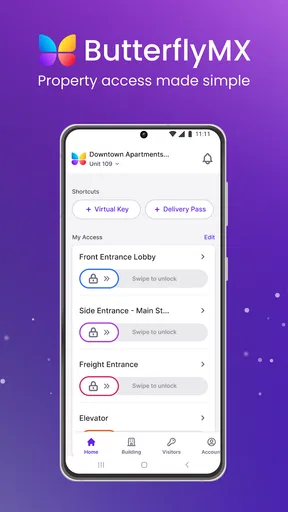
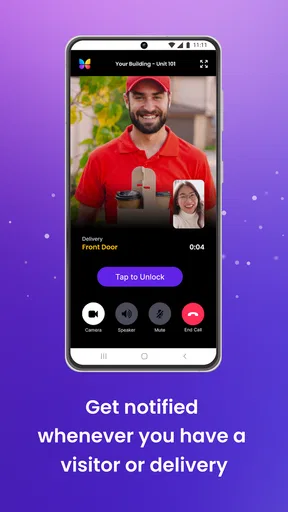
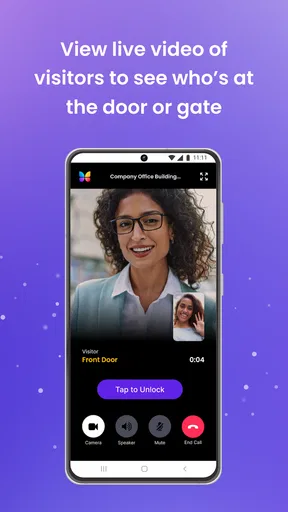
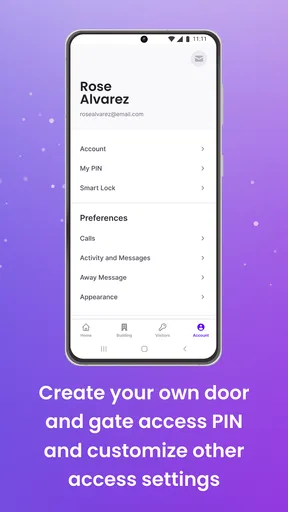
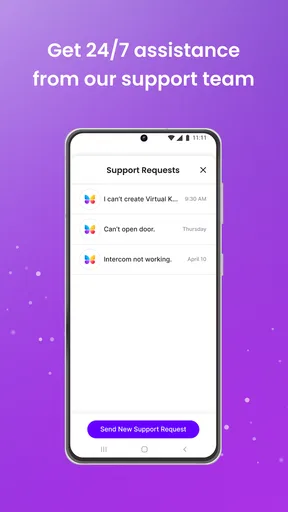
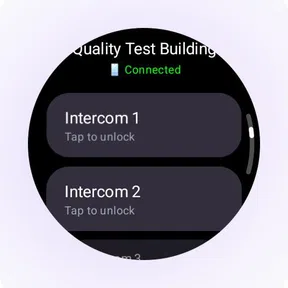
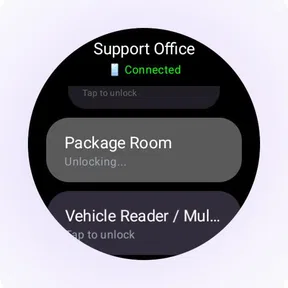
 Analysis by AppCompare
I started looking at ButterflyMX as a practical access app rather than another productivity tool that tries to manage every part of life. Its purpose is narrower and, in the right home or building, much more useful: it helps people handle entry through a ButterflyMX-enabled access system from a phone. That focus makes the experience easy to understand, but it also means the app’s value depends heavily on where you live and how your building manages access.
In my experience, the most convincing reason to use it is shared convenience. A household member can deal with an arriving visitor while another person is away, and someone who is already carrying groceries does not need to search for a physical key at the exact moment the door or gate needs attention. The app is free, aimed at Everyone, and developed by ButterflyMX, Inc. That combination makes it approachable for a mixed household, although the person installing it should still think carefully about who needs access and who only needs occasional help.
How ButterflyMX fits into a shared household
I think of a shared access app as one part of a household routine, not a replacement for deciding who handles the door. In this section, I’ll focus on how residents can divide responsibility and make visitor access predictable, then look at the small choices that help the arrangement work smoothly.
A useful app when access is a household task
The everyday scenario is simple. I imagine coming home with bags while a delivery person is waiting downstairs, or sitting at work when a family member arrives at the building. Instead of treating entry as a one-person responsibility, ButterflyMX can become part of the household’s coordination routine. The person who receives the alert or sees that someone is waiting can respond, while another resident continues with whatever they are doing.
That shared-use angle is more important than the store summary might suggest. An access app is not only about opening a door; it changes how a household handles timing. If one person is home, that person may be able to deal with a visitor. If nobody is available, the app does not magically solve the problem, but it can make the decision clearer because the relevant resident can respond from a phone rather than relying on a neighbor or a physical key.
I would not describe it as a family organizer, messaging app, or general home-management platform. Its strength is being a focused bridge between residents and an installed ButterflyMX access setup. That distinction matters. People who want shared calendars, chore lists, location sharing, or broad smart-home automation will need other tools. People who mainly want more flexible building entry may find the limited scope refreshing.
What I would decide before installing it
The first question is not whether the app looks polished. It is whether the building, community, or property already uses ButterflyMX. Without that connection, the app is unlikely to have a meaningful role in daily life. I would check with the property manager or whoever handles resident access before asking every household member to install it.
Worth Reading Before You Choose

EA SPORTS FC Mobile 26 Is a Bigger Football Game, but It Takes Time

Flipboard Shows What News Apps Must Do Beyond the Feed

Switching to Android Auto Means Rethinking Your Driving Routine

Google Calendar Makes a Crowded Week Easier to Manage

Ludo King Makes the Most of the Minutes Between Plans

Baby Panda World Brings Quick Play to Modern Phones, but Its Game Library Feels Busy
I would also agree on a simple household rule: who should respond to visitors, who should be contacted when something goes wrong, and which phone belongs to which resident. That may sound obvious, but access tools become confusing when several people assume somebody else is handling the same request. A short conversation prevents the app from becoming another source of uncertainty.
For a couple, roommates, or a small household, the arrangement can be straightforward. For a larger home, I would keep the access circle limited to people who genuinely need it. The goal is not to put every device in the household into the process. The goal is to give the right residents a dependable way to coordinate entry.
Setup boundaries are part of the experience
ButterflyMX is not a substitute for the building’s access administration. The app sits on top of an existing relationship between residents and the property. That creates a useful boundary: the phone can make access more convenient, but it does not replace the need for the correct resident account or the building’s own approval process.
When I think about setting it up on a shared device, I would avoid signing in casually on a tablet that guests, children, or visitors use freely. A phone belonging to the resident who is supposed to manage entry is a more sensible home for the account. If a household shares one device, everyone should understand that the device may be connected to an access responsibility, not just a casual utility.
This is one of the less obvious trade-offs. A shared phone can make coordination easier because more than one person sees what is happening, but it also blurs accountability. A personal phone keeps the boundary clearer, while a household tablet may be convenient in theory but awkward in practice. I would choose based on who is trusted to respond, not simply on which screen is always nearby.
The current version is 1.64.0, and the app has been available since September 25, 2013. That long presence gives it the feel of an established access product rather than a brand-new experiment. Still, I would treat updates as part of normal maintenance. Access is a poor area for a household to ignore app updates, because a stale installation can create avoidable friction when the app is needed quickly.
Coordinating visitors without making promises
The best household workflow is to use the app alongside a clear verbal or written plan. For example, one person handles daytime visitors, another handles evening arrivals, and both know whom to contact if the first person cannot respond. ButterflyMX can support that arrangement, but it does not replace the arrangement itself.
I like this approach because it avoids a common mistake: assuming that installing the same app on several phones automatically creates teamwork. It does not. Shared access works better when people know whether they are expected to act, merely observe, or wait for another resident. The app is most helpful when the household has already decided how to divide attention.
For deliveries, I would be especially careful about timing. If a resident opens access while distracted, the visitor may arrive before anyone is ready to meet them. A better habit is to confirm who is expected, tell the other household members what is happening, and then handle the entry step. That small pause turns a quick tap into a more controlled routine.
Another practical insight is to avoid making the app the only communication channel between residents. If a visitor is important, I would also send a normal message or make a call. That gives the household a backup when someone’s phone is muted, unavailable, or being used by someone else. ButterflyMX can simplify access, but dependable coordination still benefits from an independent way to reach one another.
Age, trust, and the meaning of “Everyone”
The Everyone content rating makes the app broadly suitable from an age-classification perspective, but that should not be confused with giving every child responsibility for building entry. A younger household member may be able to use a phone comfortably and still not be ready to decide whether an unfamiliar person should be admitted.
I would separate technical ability from judgment. A teenager who regularly comes home alone may need a convenient way to enter, while a younger child may only need an adult to manage visitors. The right choice depends on maturity, the building’s layout, and the household’s trust rules. The app itself should not be treated as a substitute for those decisions.
This is where account boundaries matter most. I would not hand access responsibility to a guest simply because that person is staying for a few nights. I would also avoid leaving a logged-in phone unattended in a place where visitors can pick it up. The convenience of a digital entry tool is strongest when the household is deliberate about who can act through it.
For older relatives, the appeal may be less about advanced technology and more about reducing the need to handle keys or remember a separate entry routine. I would introduce it slowly, show the exact situation in which it should be used, and make sure the person knows whom to call if the expected screen or response does not appear. A simple explanation is more valuable than assuming everyone will understand the workflow immediately.
Where it feels better than the usual alternatives
The traditional alternative is a physical key, fob, or building remote. Those options are familiar and do not depend on opening an app, but they can be inconvenient when a resident is away, when a visitor needs help, or when several people must coordinate from different places. ButterflyMX is more flexible in those moments because it brings access management into a device people already carry.
Compared with a general smart-home app, ButterflyMX also has a clearer purpose. Broad platforms can be useful when a household wants lights, thermostats, cameras, and locks in one place, but they may feel excessive for residents who only need building entry. A focused app can be easier to explain to a roommate or relative who does not want a complete connected-home system.
There is a trade-off, though. A physical key remains useful when a phone battery is depleted, a device is misplaced, or a resident simply wants a method that does not involve a screen. I would not throw away every backup method just because the app is convenient. For critical access, redundancy is sensible, especially for households with older residents, children, or people who frequently travel.
ButterflyMX also differs from a generic communication app because its usefulness is tied to a real access point. A group chat can tell everyone that someone is waiting, but it cannot by itself handle the building’s entry process. On the other hand, a chat is often better for explaining context. In my view, the strongest household setup uses ButterflyMX for the access action and ordinary communication for the conversation around it.
Small habits that make the app less frustrating
I would keep the app easy to reach rather than burying it in a folder full of rarely used utilities. Access requests tend to happen at inconvenient times, so reducing the number of steps before checking the app is worthwhile. I would also make sure every regular resident knows which phone is expected to respond first.
A second habit is to test the household routine during a calm moment instead of waiting for an actual visitor. Each person can learn who handles the request and what the backup plan is. This is especially useful when a roommate moves in, a relative begins staying at the home, or a resident replaces their phone.
A third habit is to review the arrangement whenever the household changes. Someone moving out should no longer be treated as part of the normal access team, while a new resident may need a clear introduction. I would handle those changes through the property’s proper process rather than assuming that installing or removing an app alone settles every access question.
The most important tip is to think in terms of responsibility, not just availability. A phone that can receive an access request is not automatically a phone that should answer every request. Assigning a primary person and a backup makes the experience calmer and reduces accidental decisions.
Who will appreciate it, and who should skip it
I think ButterflyMX is a good fit for residents of buildings that already use the service, especially households where people arrive at different times or regularly need to coordinate visitors. It is also appealing for someone who dislikes carrying a separate fob everywhere or who wants a more flexible way to deal with entry while away from home.
Roommates may find it useful because it reduces the need to leave keys under mats or ask neighbors to help with arrivals. Couples can use it when one person is traveling. A household with an older relative may appreciate having a clearly defined digital option, provided the relative is comfortable with the phone and understands the boundaries.
I would skip it if the building does not support ButterflyMX, if the household strongly prefers physical access only, or if nobody wants the responsibility of managing visitor entry from a phone. It is also not the right answer for someone looking for a complete home-security suite, a family-control dashboard, or a general productivity workspace. The app’s narrow purpose is a benefit only when that purpose matches the problem.
Its public reception is strong, with a 4.8 average from around 17 thousand ratings and roughly 1.2 thousand written reviews. The app has passed half a million installs, which suggests that it is not an obscure experiment. I still would not choose it from those figures alone. For an access app, compatibility with the property and the household’s habits matters more than popularity.
My household verdict
After considering how it works in a shared home, I see ButterflyMX as a focused convenience tool with a sensible role. It can make building entry less dependent on one person being physically present, and it gives households a practical way to coordinate visitors across different schedules. The free price removes an obvious barrier, while the simple purpose makes it easier to explain than a large smart-home platform.
My main reservation is not about the idea itself; it is about overestimating what the app can solve. It does not create trust between household members, decide who should admit a visitor, or replace a backup plan. Those decisions remain human. If a household treats the app as one part of a clear access routine, it can reduce everyday friction. If everyone installs it without agreeing on responsibility, it may simply add another place for confusion.
For me, the deciding test would be practical: does the property support it, and will the people using it benefit from flexible coordination? If the answer is yes, I would recommend trying it, especially for roommates, couples, and families with changing schedules. If the answer is no, a physical key or the building’s existing method is probably the better choice. In the right home, ButterflyMX earns its place by making access easier without pretending to be more than an access app.
Pros
- Video intercom lets you see and speak with visitors remotely.
- Virtual keys make it easy to grant temporary building access.
- Delivery PINs can simplify package drop-offs in supported buildings.
- Access history helps residents monitor entry activity.
- Works with multiple ButterflyMX entry devices in one app.
Cons
- Most features require your building to have ButterflyMX hardware installed.
- Some buildings may restrict which access tools residents can use.
- Video quality and call reliability depend on internet connectivity.
- Notifications may be delayed by phone settings or background limits.
- Certain controls and features vary according to property management settings.
FAQs for ButterflyMX
What is ButterflyMX, and what can I use it for?
ButterflyMX is a smart property access and building-management app designed for residents, guests, property managers, and building staff. After connecting it to a supported ButterflyMX intercom or access system, you can answer video calls, unlock doors or gates remotely, generate virtual keys, manage guest access, and receive building-related notifications. The exact features available depend on the hardware installed at your property and your account permissions.
Do I need ButterflyMX hardware or an invitation from my property manager to use the app?
Yes. Installing the app alone does not provide access to buildings or communities. You generally need to live in, work at, or visit a property that uses ButterflyMX equipment, and an administrator must invite or register you with the correct phone number or email address. Without a supported intercom or access controller linked to your property, many of the app’s main functions, such as remote unlocking and video entry calls, will not be available.
Can ButterflyMX unlock my building or gate remotely?
If your property has compatible ButterflyMX access hardware and your account has permission, the app can let you open doors, gates, elevators, or other connected entry points remotely. You may unlock access during an intercom call or through the app’s access controls, depending on the installation. For security, permissions are controlled by the property administrator, and the feature may fail if your phone lacks internet access, the hardware is offline, or your access rights have expired.
Can I use ButterflyMX to let in guests, deliveries, or service providers?
ButterflyMX includes guest-access tools that can make visits and deliveries easier. Depending on the property’s configuration, you may create virtual keys, send invitations, set access schedules, or provide temporary entry instructions. Some buildings also support delivery and package-related workflows. Guest access is not identical at every location, however, because administrators choose which features are enabled and may restrict the days, times, doors, or users allowed to enter.
What should I do if I cannot log in, receive an intercom call, or unlock the door?
First, check that you are using the email address or phone number registered by your property, that notifications and microphone permissions are enabled, and that your device has a reliable internet connection. Updating the app and restarting your phone can also help. If the problem continues, contact your property manager or building administrator, since they control resident invitations, access permissions, hardware settings, and many account-related issues that cannot be fixed from the app alone.


